Bus Icon Vector Set: A Practical Review for Designers and Content Creators
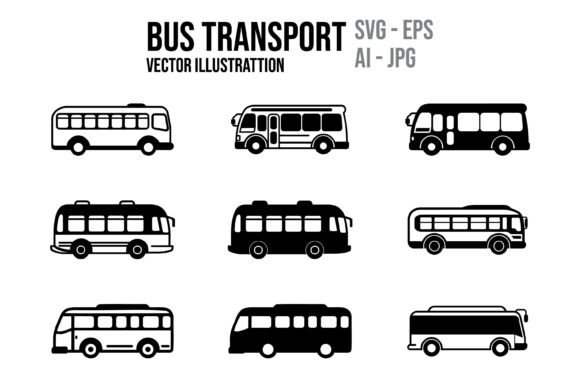
When assembling visual assets for transport-related projects, the Set of Icon Vector Bus emerges as a specialized resource worth close examination. This collection, often marketed as a 12-icon bus transport illustration set, provides a compact but focused toolkit for designers working across print, digital, app, and web environments. Rather than a sprawling icon library, this set zeroes in on bus-related imagery, offering vector illustrations that are fully editable in standard vector software. For anyone evaluating icon sets for a specific project, understanding the strengths, limitations, and practical use cases of this particular collection can help determine whether it aligns with your goals.
What the Bus Icon Vector Set Contains
At its core, this set delivers 12 distinct bus transport vector illustrations. Each icon is crafted as a detailed vector graphic, meaning the artwork is composed of paths and curves rather than pixels. This fundamental characteristic sets it apart from raster images, as vectors can be scaled infinitely without loss of quality. The package includes five file formats: Adobe Illustrator AI, PDF, high-resolution JPG, EPS, and SVG. This multi-format approach ensures broad compatibility across design workflows, from Adobe Creative Cloud to open-source vector editors. The availability of SVG is particularly relevant for web developers, as SVGs integrate directly into HTML and CSS without intermediary conversion steps.
File Format Breakdown and Practical Implications
Each format serves a distinct purpose, and understanding these differences is critical for selection. The AI file is native to Adobe Illustrator, preserving full layer structure and editable paths. The EPS file offers broader legacy compatibility, which can be crucial if you work with older versions of design software or collaborate with teams using non-Adobe tools. The SVG file is the go-to for web-based projects, enabling responsive scaling and easy color modification via inline CSS. The PDF format is useful for client previews or print-ready submissions, while the high-resolution JPG provides a quick raster version for mockups or situations where a non-editable image suffices. This diversity reduces the need for format conversion, streamlining integration into existing workflows.
Reasons to Consider This Icon Set
Several practical motivations might lead a designer or content creator to evaluate this specific collection. First, the niche focus on bus transport means you avoid paying for a large general icon pack where only a fraction of assets are relevant. If your project revolves around public transit, school bus routing, tourism, or logistics, this set provides immediate, targeted coverage. Second, the vector nature of the icons supports scalability from small app buttons to large billboard designs. This flexibility is especially valuable if you anticipate using the same visual asset across multiple mediums.
Another factor is the editable nature of the files. Unlike purchased raster images that are locked in appearance, vector icons allow you to adjust colors, stroke weights, and individual elements. For example, you could repurpose a school bus icon for a city bus by changing the palette and removing the stop sign detail. This customizability extends the useful life of the assets beyond their original design, making them adaptable to brand guidelines or campaign-specific visual languages.
Who Stands to Benefit Most
- UI/UX designers working on transit apps or wayfinding interfaces who need consistent, scalable icons for buttons or map markers
- Marketing and communications professionals developing infographics or brochures about bus routes, safety campaigns, or service updates
- Educators and trainers creating materials for driver education or school transport handbooks
- Web developers who prefer lightweight SVG icons that load quickly and align with responsive design principles
Tradeoffs and Limitations to Weigh
No icon set is universally optimal, and this bus vector collection has notable tradeoffs. The most immediate limitation is the count of 12 icons. While a focused set avoids bloat, it also restricts the variety of bus types and angles available. If your project requires icons for articulated buses, double-decker buses, or vintage models, you may find the selection insufficient. Similarly, the set may lack contextual elements like bus stops, ticket machines, or passenger silhouettes that complete a transport interface. In such cases, you might need to supplement with additional icon packs or create custom assets yourself.
Another consideration is the level of detail. The description emphasizes "detailed vector illustrations," but detail can be a double-edged sword. Highly detailed icons may not scale down well for small UI elements; the finer lines can become muddled at 24×24 pixels. If your primary use case is mobile app interfaces with small touch targets, simpler, more geometric icons might serve you better. Conversely, for large-format print projects, the detail can be an asset. Evaluating the actual icon style before purchase is wise, but since you often see only previews, request sample files if possible.
Software Requirements and Learning Curve
While the set is sold as "fully editable and customizable using your favorite vector software," the level of editability depends on your tools. Users of Adobe Illustrator will have the full experience with layer organization and path editing. However, if you rely on free or open-source software like Inkscape, the AI format may not open cleanly, though SVG and EPS should work. Expect some loss of formatting when moving between proprietary and non-proprietary applications. Similarly, if you are not comfortable with vector editing tools, the promise of customizability may remain unrealized. In that scenario, the high-resolution JPG might become your primary format, which negates many vector advantages.
Situations Where Alternatives Make More Sense
There are clear contexts where this set may not be the best fit. For large-scale projects requiring dozens or hundreds of transport icons, a broader icon library covering vehicles, infrastructure, and pedestrian elements would offer better value. Similarly, if your visual style demands a specific aesthetic—such as flat, outline, or isometric design—and this set skews toward detailed illustration, a mismatch will create consistency problems across your materials. Another scenario is when you need icons that are licensed for commercial redistribution, such as embedding them into a software product or selling templates. Always verify the license terms, as some icon sets restrict derivative works or require attribution, which might clash with your goals.
When the Set Shines
Conversely, this collection is a strong fit for projects where bus imagery plays a central but limited role. Imagine a regional transit authority updating its website with clear, friendly bus icons for each service line. Twelve icons cover the core fleet without overwhelming the user. Or consider a school district preparing a parent handbook: a set of bus icons can illustrate loading zones, seat belts, and emergency exits with consistent visual language. In these cases, the focused range and editable formats save time versus creating icons from scratch or selecting from a general set where most assets go unused.
Practical Decision-Making Insights
To determine whether the Set of Icon Vector Bus aligns with your needs, start by mapping your specific use cases against the 12 icons. List the bus-related visuals you require and count how many are likely covered. If the number falls short by more than a few, factor in the time cost of creating or sourcing additional icons. Next, assess your technical comfort with vector editing. If you plan to customize colors or combine icons, ensure you have software that handles the provided formats reliably. If you intend to use the icons primarily as static graphics without modification, the JPG format may suffice, but then you lose scalability and editability—two of the set's core advantages.
Also consider the long-term lifecycle of your project. For a one-time brochure, the upfront cost of this set is justified if it saves design hours. For an ongoing digital product with frequent updates, the SVG and AI formats enable quick iteration: you can change a bus color across all pages with a single edit. Factor in version control: vector files can be managed in shared libraries, keeping your team aligned on visual standards.
Evaluating Fit Through a Simple Checklist
- Coverage: Does the 12-icon scope match your project's bus-related visual needs?
- Scale: Will your primary output be large-format (print) or small-scale (UI)? The detail level matters accordingly.
- Editability: Do you possess the skills and software to fully leverage AI, EPS, and SVG files?
- Consistency: Does the illustration style harmonize with your existing visual identity?
- Licensing: Are the terms compatible with your intended use, especially if redistribution is involved?
By stepping through these considerations, you can move beyond the surface appeal of "12 detailed vector icons" and assess whether this set delivers practical value for your specific workflow. No icon set is universally indispensable, but for projects centered on bus transport, this collection offers a targeted, editable, and multi-format solution that, when aligned with your requirements, can streamline production and maintain visual coherence across media.