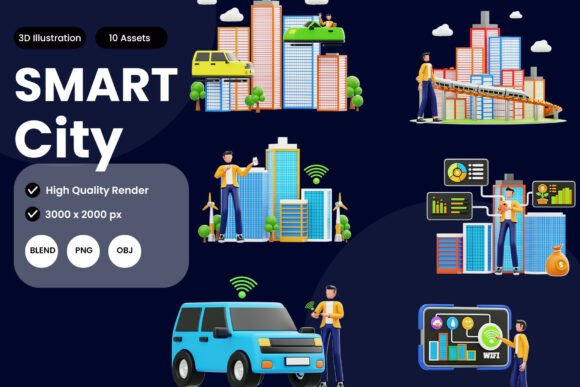
Smart City 3D Illustration Pack
Visualizing the future of urban living requires more than abstract diagrams or static flat icons. Smart City 3D Illustration Pack bridges the gap between concept and reality, offering a ready-to-use library of high-quality 3D models that represent modern city infrastructure. From sleek smart buildings and connected transportation systems to renewable energy solutions and tech-driven public spaces, this collection gives creators and professionals a powerful toolkit to communicate complex urban ideas with clarity and impact.
As cities around the world embrace digital transformation, the need for compelling visual assets grows. Urban planners present proposals to stakeholders, marketers launch smart city campaigns, educators explain sustainable development, and designers craft interfaces for mobility or energy apps. In each case, a single flat image often falls short. The Smart City 3D Illustration Pack delivers depth, realism, and flexibility, enabling users to tell richer stories about how technology and infrastructure shape tomorrow’s communities.
Why Smart City 3D Assets Matter Now
Smart city initiatives are no longer distant visions. Governments and private enterprises invest heavily in IoT sensors, autonomous vehicles, smart grids, and data-driven governance. Communicating these projects to investors, citizens, and partners demands visuals that feel tangible and credible. Generic icons or stock photos cannot capture the layered, interconnected nature of a truly smart environment. That’s where 3D illustration steps in.
The Smart City 3D Illustration Pack addresses this gap by providing assets that reflect current design trends and technological realities. The models avoid exaggerated sci-fi elements; instead they focus on plausible, near-future urban features. Solar-paneled rooftops, sensor-laden streetlights, autonomous shuttles, green facades, and digital kiosks all appear with realistic proportions and materials. This grounded approach makes the illustrations suitable for professional settings where trust and accuracy matter.
Designers and marketers increasingly recognize that audiences respond better to immersive visuals. A 3D scene showing a pedestrian plaza with smart waste bins and energy-efficient lighting can convey efficiency and livability more effectively than a paragraph of data. By integrating the Smart City 3D Illustration Pack into presentations, reports, or interactive prototypes, professionals can create emotional connections with viewers while staying information-rich.
Evolution of Visual Communication in Urban Development
For decades, city planning visuals relied on architectural renderings, cartographic maps, and later, simple 2D infographics. While these tools remain useful, they lack the dynamism required to explain smart systems that operate in real time. Citizens expect to see how sensors, data flows, and automated services affect their daily commute, energy consumption, and safety. 3D illustrations offer a middle ground between detailed simulation and graphic design.
The trend toward 3D in non-gaming industries has accelerated. UI/UX designers now incorporate perspective and depth into dashboards for smart city management platforms. Marketing teams use 3D assets in animated explainer videos that show how a new transit system reduces congestion. The Smart City 3D Illustration Pack fits directly into this evolution. Instead of each team building its own models from scratch, they can access a consistent visual library. This reduces production time, ensures design coherence, and lowers the barrier for smaller organizations to produce polished material.
Another important shift is the move toward cross-platform compatibility. Designers work in diverse software ecosystems. Some prefer Blender for its open-source flexibility; others rely on Adobe Creative Cloud or game engines like Unity. The pack’s BLEND file allows deep customization and animation within Blender, while the OBJ format ensures seamless import into almost any 3D application. The PNG transparent renders offer instant use for non-3D specialists. This versatility acknowledges how modern creative teams collaborate across tools and skill levels.
Practical Applications for Designers, Developers, and Marketers
The strength of the Smart City 3D Illustration Pack lies in its adaptability. Let’s explore how different professionals can leverage it in realistic scenarios.
User Interface and UX Design
Imagine designing a dashboard for a city’s energy management platform. You need icons and illustrations that convey solar farms, smart meters, and grid monitoring without cluttering the interface. With the pack, you can place 3D illustrations of solar panels and battery storage units directly into mockups. The PNG renders have transparent backgrounds, so they integrate smoothly into wireframes or high-fidelity prototypes. For interactive projects, you can import the OBJ models into Figma, Sketch, or prototyping tools that support 3D layers, adding subtle rotation or lighting interaction. This elevates the user experience from flat data displays to immersive control panels.
Infographics and Data Visualization
Numbers about population growth, energy savings, or traffic reduction need visual anchors. An infographic comparing conventional vs. smart street lighting can feature a 3D model of each pole type. The Smart City 3D Illustration Pack includes assets like smart traffic lights, EV charging stations, and connected bus stops. By combining these with charts and callouts, you create infographics that are both educational and aesthetically compelling. The high-resolution PNG renders download quickly and maintain crisp edges at various scales, suitable for print or digital publication.
Animations and Presentations
For conferences, investor pitches, or public consultations, animated 3D scenes build powerful narratives. Editing the BLEND file lets you animate moving vehicles, rotating wind turbines, or changing light sequences on a smart building. You can render short clips or export image sequences for video. Even without animation skills, you can use the static PNGs in slide decks with layered transitions to simulate movement. The consistent style across all models ensures visual harmony throughout your presentation.
Educational Content and Online Courses
Educators teaching urban planning, sustainability, or smart technology can use the pack to create lecture visuals. A slide showing different layers of a smart city—transportation, energy, digital infrastructure—becomes more intuitive when each layer is a distinct 3D asset. Students grasp abstract concepts like Internet of Things when they see a 3D model of a sensor node attached to a streetlamp. The OBJ format also allows educators to bring assets into game engines for interactive virtual tours, making learning more engaging.
Understanding the Included File Formats
One of the pack’s main strengths is its thoughtful file variety. Let’s break down what each format offers and when to use it.
- PNG (High-Resolution Transparent Renders) – These are ready-to-place images with alpha channels. Perfect for designers who need quick, clean visuals without opening 3D software. Use them in websites, social media graphics, flyers, or slide decks. The resolution supports both screen and print applications.
- BLEND (Blender File) – This gives full access to the source scene. You can modify materials, change camera angles, adjust lighting, or animate any element. Ideal for users comfortable with Blender who want to customize models to fit specific color palettes or interaction designs. The file is structured with clear naming, making it easy to find and tweak individual components.
- OBJ (Standard 3D Object Format) – A universal format readable by virtually any 3D application, including Maya, 3ds Max, Cinema 4D, Unreal Engine, and many CAD programs. Texture maps and materials may be provided separately, but the geometry is compatible everywhere. This format is valuable for teams with mixed software pipelines or for future-proofing assets.
Having all three formats means you can choose the workflow that suits your current project. You are never locked into one tool or dependent on a specific version of a program.
Meeting Modern Workflow Demands
Today’s creative and business environments demand speed without sacrificing quality. The Smart City 3D Illustration Pack saves hours of modeling time and ensures that visuals are consistent across a campaign or publication. Instead of hiring a 3D artist to create custom infrastructure models, teams can use the pack as a foundation, perhaps combining assets with their own branded elements or data overlays.
Moreover, the pack aligns with the growing expectation for sustainable design practices—using existing resources to reduce redundant effort. Freelancers and small agencies, in particular, benefit from such a library because it allows them to compete with larger firms in producing high-end visuals. A one-person studio can deliver a smart city concept presentation that looks like it came from a team of specialists.
Another emerging trend is the use of 3D assets in augmented reality (AR) and virtual reality (VR) experiences. City councils, real estate developers, and tech companies increasingly deploy AR apps to let citizens preview proposed projects on-site. The OBJ and BLEND formats can be optimized for real-time rendering. With minor adjustments, you can place a smart building model on a physical street view through mobile AR. This immediate connection between digital and physical space makes the pack relevant for cutting-edge marketing and public engagement.
Choosing the Right Visuals for Your Message
Not every smart city story needs a futuristic skyline. Sometimes the focus is on a single element like a smart waste bin that reports fill levels. The Smart City 3D Illustration Pack includes both standalone objects and composed scenes, allowing you to zoom in on details or show the big picture. For example, a logistics company might use the model of an autonomous delivery vehicle in a brochure, while a city government could use the entire urban plaza scene to depict an inclusive public space.
When selecting assets, consider your audience’s familiarity with smart city concepts. For general consumers, emphasizing visible benefits—like green spaces and efficient transit—works best. For technical stakeholders, you might highlight sensor networks and data flows. The pack’s flexibility supports both approaches because each model is isolated and can be placed in different contexts. You are not forced to use every element; cherry-pick what serves your narrative.
Recommendations for Getting the Most Out of the Pack
To maximize the value of the Smart City 3D Illustration Pack, follow these practical tips:
- Start with the PNGs for speed – If you face a tight deadline, drop the transparent renders directly into your layout. They already have professional lighting and composition that can be used as-is.
- Use BLEND for brand alignment – Open the Blender file to tweak colors, add logos, or adjust shading to match your brand guidelines. The non-destructive workflow means you can always revert to original.
- Combine formats in one project – Use OBJ assets for interactive prototypes while using PNGs for static screens. This ensures consistency across all touchpoints.
- Create a modular system – Mix and match different models to generate multiple unique scenes. For example, swap out a traditional building for a green-roof smart building to emphasize sustainability.
- Consider accessibility – When presenting to diverse audiences, pair the 3D visuals with simple annotations or audio descriptions. The illustrations should enhance understanding, not confuse.
Looking Ahead: The Role of 3D Illustrations in Smart City Storytelling
As urban technology becomes more embedded in daily life, the demand for accurate and appealing visual communication will only grow. The Smart City 3D Illustration Pack represents a shift from generic stock art to purpose-built, realistic representations that respect both technical detail and aesthetic quality. Whether you are a designer crafting a mobile app for public transit, a marketer selling a smart lighting solution, or an educator explaining the Internet of Things, having a reliable set of 3D assets gives you a significant advantage.
What makes this pack particularly useful is its adherence to real-world design principles. The buildings follow contemporary architecture trends; the vehicles resemble prototypes already in testing; the energy infrastructure mirrors current solar and wind installations. This realism builds trust with viewers who are already skeptical of overly futuristic promises. By grounding the visuals in what is achievable today or in the near future, you position your message as credible and actionable.
The Smart City 3D Illustration Pack is more than a collection of models. It is a resource that empowers professionals to participate in the global conversation about urban innovation. As smart cities evolve, so will the ways we depict them. Investing in versatile, high-quality 3D assets now prepares you to adapt quickly, tell compelling stories, and influence how people imagine the places they live and work.